Automate Research Paper Summaries with Make.com
Build a workflow to auto-summarize academic PDFs with Notion, PDF.co & ChatGPT. Generate 2000-3000 word structured reports with dual-track output.
Ready to automate?
Start building this workflow with Make.com — free forever on the starter plan.
Overview
This is an automation solution tailored for researchers and academics.
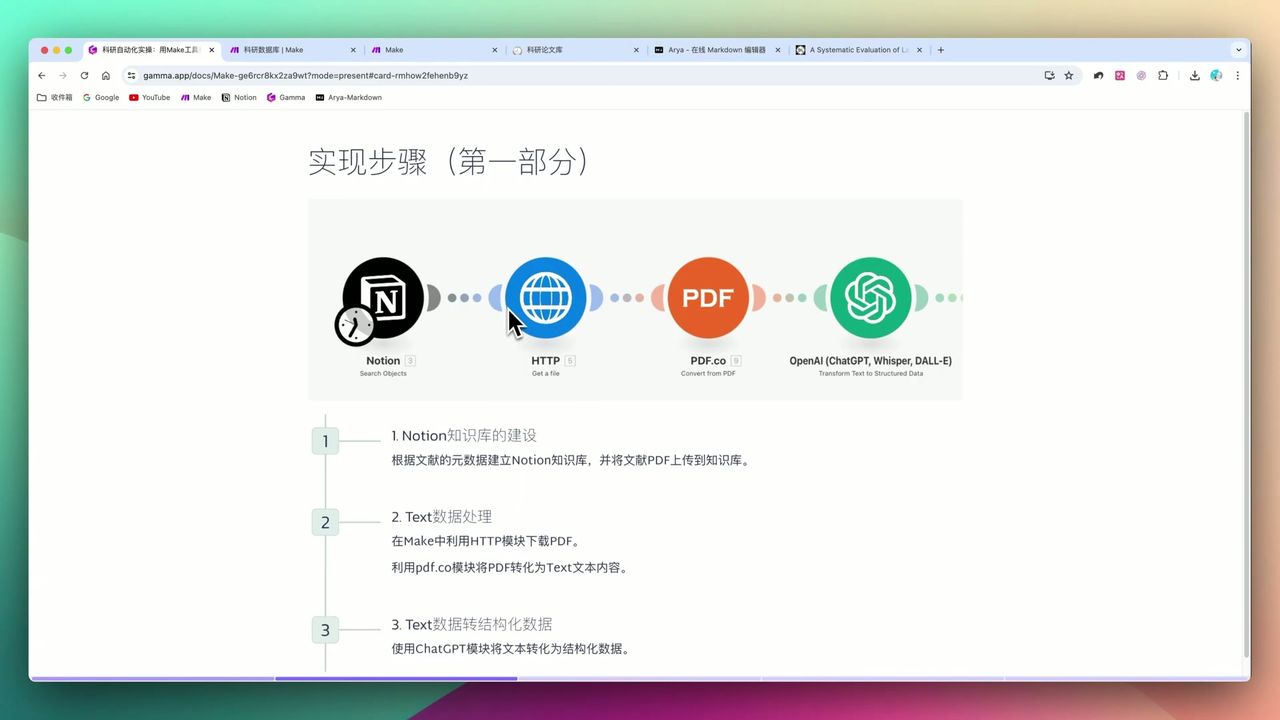
By combining Notion’s knowledge management, PDF.co’s document parsing, and ChatGPT’s intelligent summarization, you can achieve fully automated literature processing:
- Trigger Task - Notion database status changes to “Start”
- Download Literature - Automatically fetch PDF files
- Extract Text - PDF.co parses document content
- Metadata Extraction - ChatGPT extracts DOI, journal, and other structured information
- Dual-track Summary - Router enables general summary + research-specific abstract
- Archive Storage - Results written back to Notion knowledge base
 Complete research literature automation workflow architecture
Core Decision Factors
When choosing research automation tools, focus on:
- Automation Efficiency - Can it significantly reduce manual effort and batch-process literature
- Flexibility & Customization - Does it support customized prompts and output formats based on research needs
- Integration Capability - Can it seamlessly integrate Notion, PDF tools, AI models, and other common tools
- Result Quality - Are the generated summaries accurate, well-structured, and hallucination-free
- Cost-effectiveness - Are the service fees economically reasonable
Technical Specifications
| Specification | Value | Notes |
|---|---|---|
| Report Length | ~2,000-3,000 words | Adjustable via prompts |
| AI Model | GPT-4o | For summarization & metadata extraction |
| PDF Extraction Range | Pages 0-3 | Avoid context limit overflow |
| Max Token | 4,000 | OpenAI module setting |
| Output Format | Markdown | Structured report format |
| Notion Query Limit | 10 items/run | Entries processed per workflow run |
Prerequisites
Before starting, ensure you have:
- Make.com account (free registration)
- Notion account with research database
- PDF.co account (pdf.co, free tier available)
- OpenAI API key
Notion Database Structure
Create a research database with the following fields:
- Title (Title) - Paper title
- File (Files & Media) - PDF file
- Status (Select) - Unprocessed/Start/Completed
- DOI (Text) - Paper DOI
- Journal (Text) - Publishing journal
- General Summary (Text) - AI-generated general abstract
- Research Abstract (Text) - Research-specific summary
 Database schema design with metadata and summary fields
Workflow Architecture
Stage 1: Trigger & File Retrieval
Use Notion Watch Database Items module to monitor status changes:
Configuration Points:
- Monitor condition: Status field changes to “Start”
- Query limit: Recommend 10 items to avoid overwhelming processing
Stage 2: PDF Text Extraction
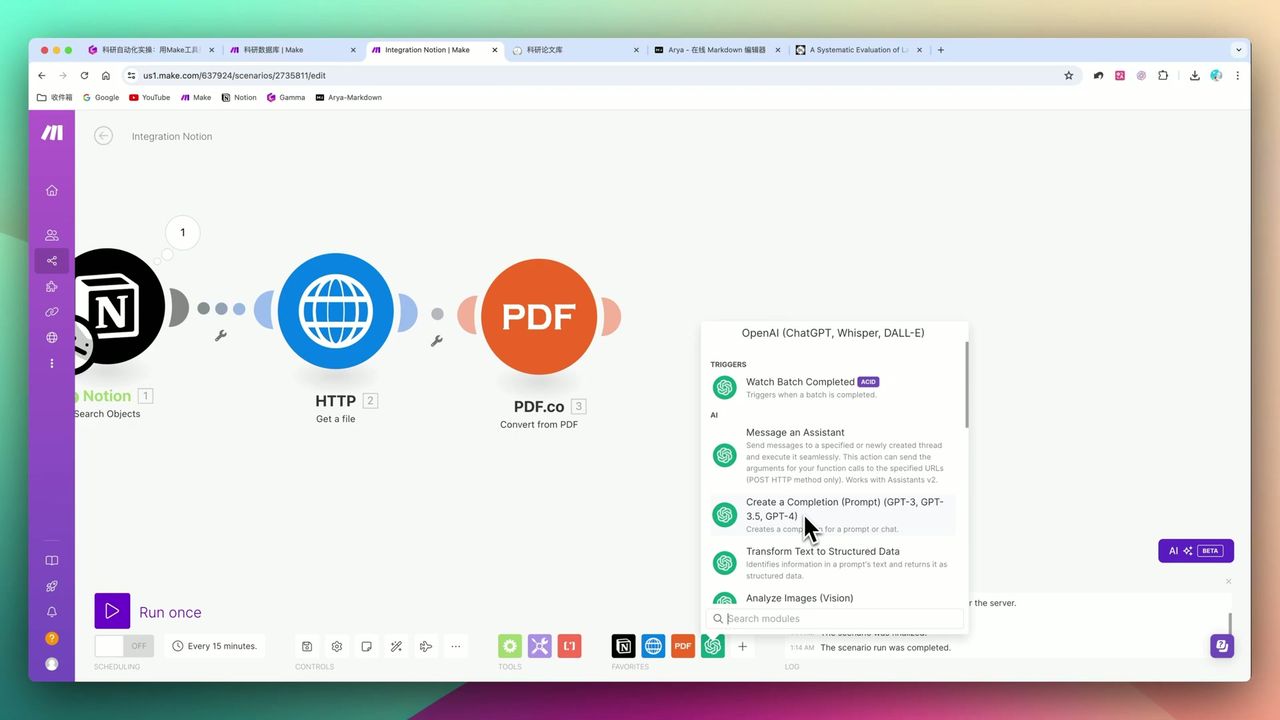 Using toString function to handle binary data
Use PDF.co’s PDF to Text module to extract content:
Key Settings:
- Extract pages: 0-3 (first pages typically contain abstract and core content)
- Output processing: Use
toStringformula to convert binary to text
Important: PDF.co outputs binary code. Direct transmission to OpenAI causes errors. Must use
toStringfunction during mapping.
Stage 3: Structured Metadata Extraction
Send extracted text to ChatGPT for structured metadata extraction:
Prompt Design:
Please extract from the following paper content:
1. Paper title
2. DOI (if available)
3. Publishing journal
4. Author list
5. Publication year

Return results in JSON format.

Paper content:
{{pdf_text}}Important: Recommend setting parameters as optional to avoid workflow errors from papers missing DOI or other information.
Stage 4: Dual-track Summary (Router)
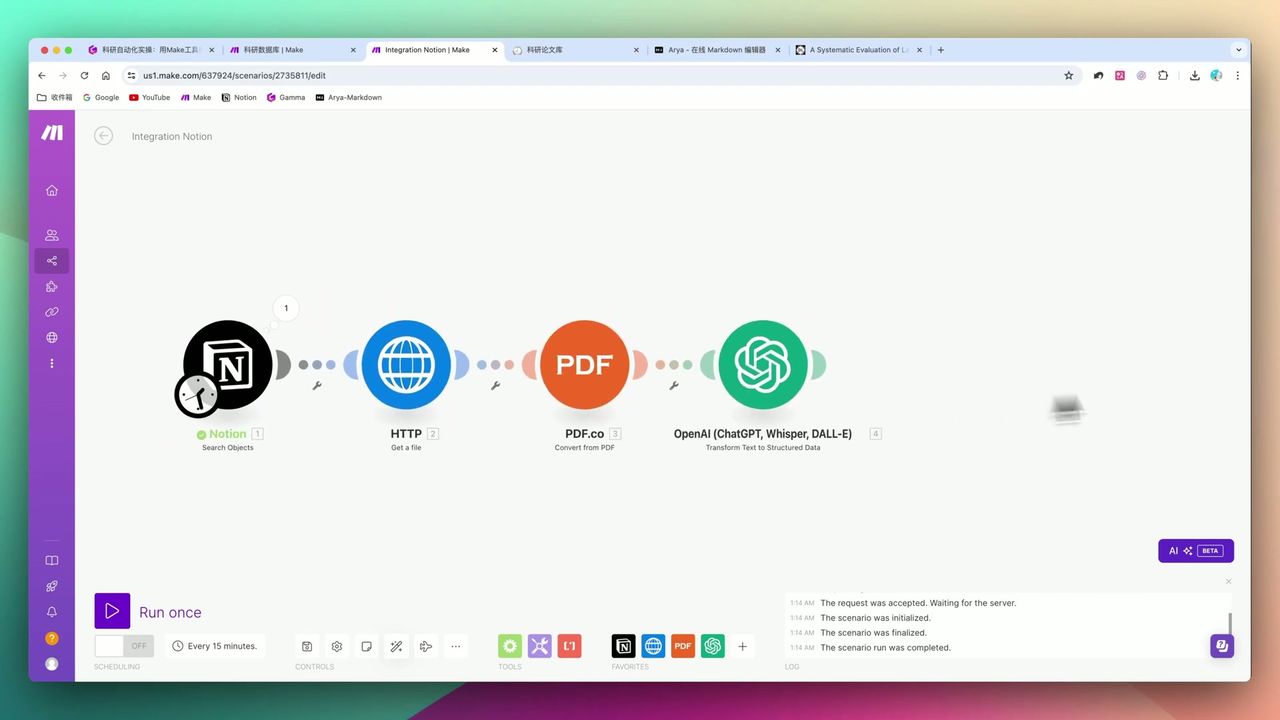 Using Router to implement general summary and research-specific abstract dual output
This is the workflow’s core highlight—using Router to create dual branches:
Branch 1: General Summary
- Generate ~2000-word literature review
- Include standard structure: research background, methods, conclusions
Branch 2: Research Abstract
- Generate targeted abstract based on your research direction (e.g., “Large Language Models”)
- Provide theoretical insights, experimental improvement suggestions, future research leads
Prompt Example (Research Abstract):
You are a scholar focused on [Large Language Models] research. Please read the following paper and analyze from your research perspective:
1. Insights this paper provides for your research
2. Methodologies worth borrowing
3. Potential collaboration or extension directions

Word requirement: 800-1000 words
Stage 5: Write Results Back to Notion
Update generated summaries and metadata to Notion:
Notes:
- When copying Router branches, manually adjust Page ID in new branch’s Notion update module
- Ensure Page ID points to correct data source, otherwise wrong pages will be updated
Gotchas
Common pitfalls in practice:
-
Missing Metadata - Preprints or some papers may lack DOI, journal info; set fields to optional
-
Context Limits - Long PDFs can only extract first few pages, may miss subsequent important information
-
Binary Conversion - PDF.co output requires
toStringfunction conversion, otherwise OpenAI errors -
PDF.co Billing - Charges per page, long-term use requires cost evaluation
-
Router Branch ID - After copying branches, manually adjust Notion module’s Page ID mapping
Results
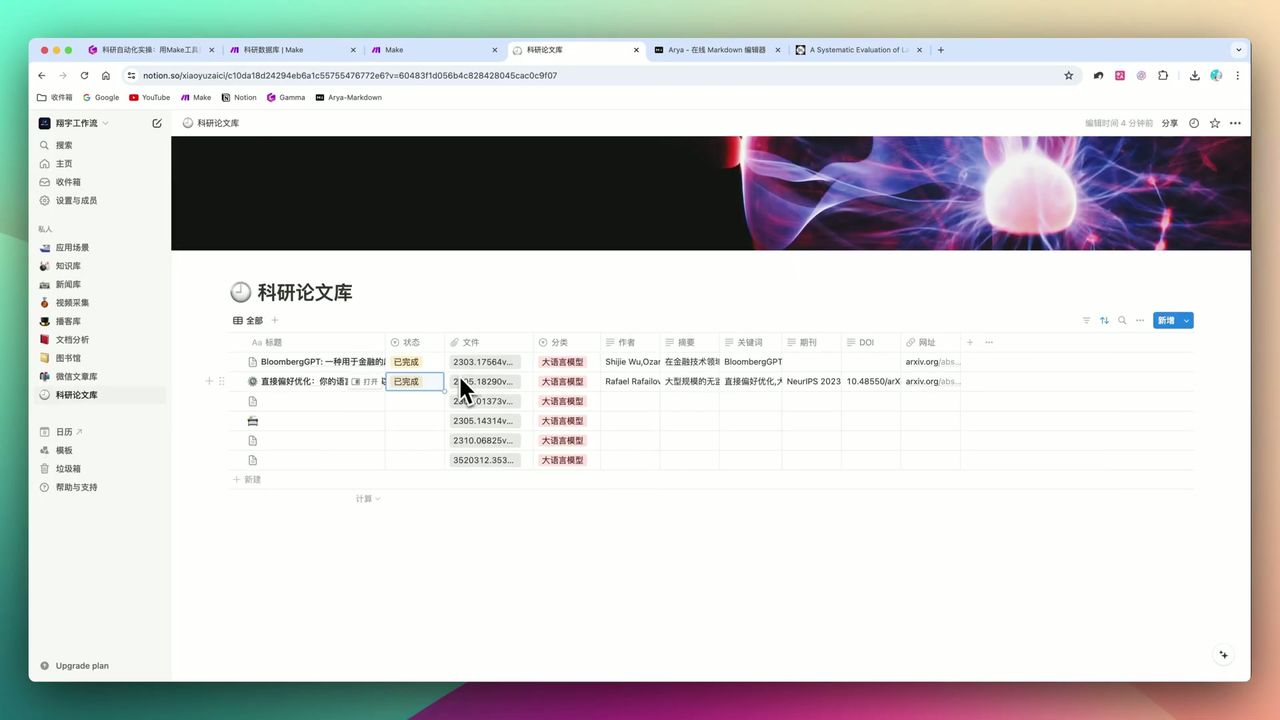 Auto-generated literature summary in Notion
Processing Capacity:
- Automatically fill paper metadata (title, DOI, journal, etc.)
- Generate 2000-3000 word structured general summary
- Generate 800-1000 word research-specific abstract
Efficiency Gains:
- Batch processing: Can process 10 papers at once
- Status-driven: Simply change status to “Start” in Notion to trigger
Use Cases
Recommended Users
- Researchers/Graduate Students/PhD Candidates - Academic workers processing large volumes of literature
- Professors - Need to quickly understand latest field developments
- Financial Analysts/Market Researchers - Professionals processing numerous reports
May Not Suit
- Complete beginners unfamiliar with Make.com and API configuration
- Budget-constrained users unwilling to pay for PDF.co
- Scenarios requiring meticulous reading and critical analysis (automation cannot fully replace deep reading)
FAQ
How to handle preprints or papers without DOI?
Metadata extraction may be incomplete. Set Notion properties to optional to avoid workflow errors from missing fields.
How to handle long PDFs with context limits?
The workflow typically extracts only the first 0-3 pages for summarization to stay within model limits. For full analysis, process in batches.
Does PDF.co charge fees?
It charges per page with free credits for new users. For long-term use, consider costs or explore alternative PDF extraction solutions.
How to implement dual-track summaries?
Use Make.com’s Router module to create two branches: one for general summaries and another for research-specific insights based on your field.
Next Steps
After mastering the basic workflow, you can try:
- Adding automatic citation format generation
- Integrating professional reference managers like Zotero
- Adding multilingual translation functionality
- Setting up scheduled tasks to auto-process newly uploaded literature
Questions? Feel free to leave comments!
FAQ
- How to handle preprints or papers without DOI?
- Metadata extraction may be incomplete. Set Notion properties to optional to avoid workflow errors from missing fields.
- How to handle long PDFs with context limits?
- The workflow typically extracts only the first 0-3 pages for summarization to stay within model limits. For full analysis, process in batches.
- Does PDF.co charge fees?
- It charges per page with free credits for new users. For long-term use, consider costs or explore alternative PDF extraction solutions.
- How to implement dual-track summaries?
- Use Make.com's Router module to create two branches: one for general summaries and another for research-specific insights based on your field.
Start Building Your Automation Today
Join 500,000+ users automating their work with Make.com. No coding required, free to start.
Get Started FreeRelated Tutorials
Make.com Tutorial: Build Your First Workflow in 5 Minutes
Make.com Core Concepts: Automation Fundamentals Explained
Build YouTube Data Archive in Notion with Make.com & Apify
Auto-Classify Notion with AI Using Make.com
About the author
Alex Chen
Automation Expert & Technical Writer
Alex Chen is a certified Make.com expert with 5+ years of experience building enterprise automation solutions. Former software engineer at tech startups, now dedicated to helping businesses leverage AI and no-code tools for efficiency.
Credentials