Automate Twitter Content with Make.com AI Refinement
Create high-density 128-character tweets using Make.com, Inoreader RSS aggregation, iterative AI refinement, and smart image matching for Twitter automation.
Ready to automate?
Start building this workflow with Make.com — free forever on the starter plan.
Overview
This is an intelligent content operation solution for the Twitter/X platform.
Through multi-round AI iterative refinement, it condenses long articles into 128-character high-density tweets:
- Content Aggregation - Inoreader aggregates multiple RSS feeds
- Content Extraction - Jina Reader retrieves full text
- Iterative Refinement - AI three-round summarization increases information density
- Smart Images - Apify captures matching images
- Image Hosting - Upload to Cloudflare Images
- Content Management - Notion review and publication trigger
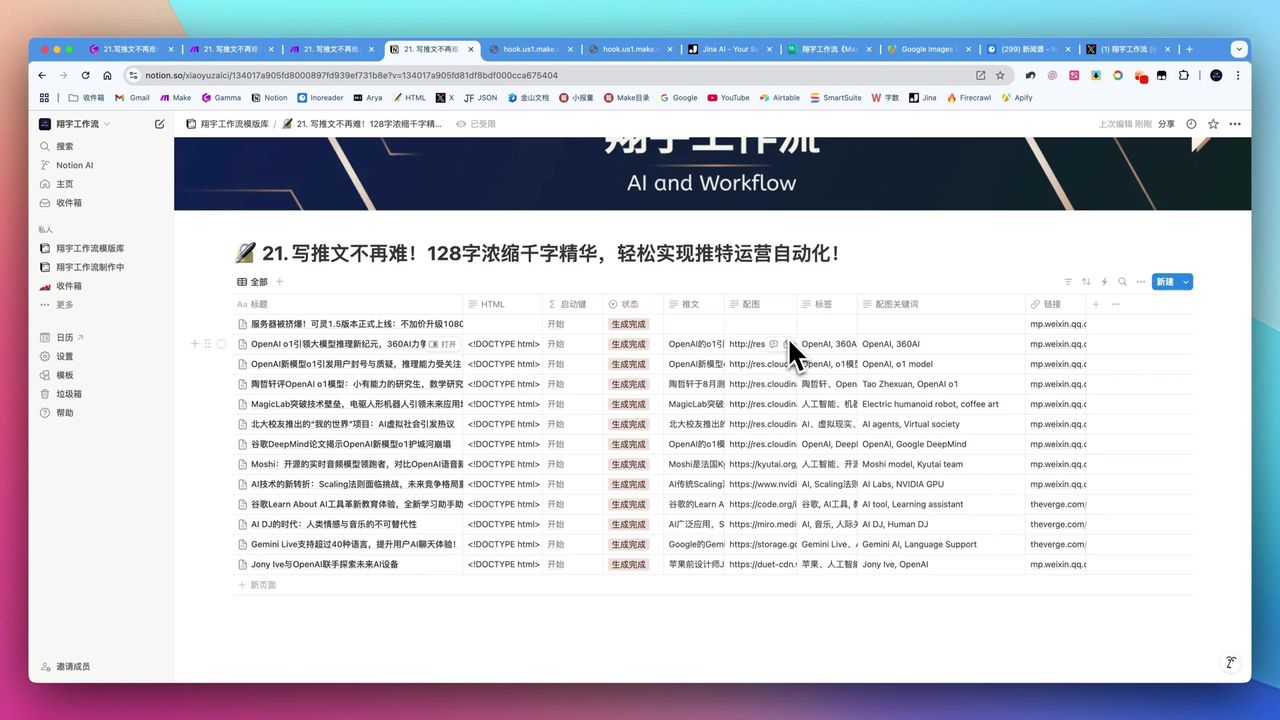 AI-generated high-density tweets with matching images
Core Decision Factors
When choosing social media automation solutions, consider:
- Content Refinement Capability - Can AI effectively compress while maintaining high information content?
- Multi-Source Aggregation - Can it efficiently collect content from multiple channels?
- Automation Level - Degree of platform integration and publication automation
- Smart Imagery - Can it automatically match high-quality images?
- Cost Efficiency - Actual costs of running AI and third-party services
Technical Specifications
| Specification | Value | Notes |
|---|---|---|
| Tweet Length Limit | 128 chars | High information density requirement |
| AI Refinement Rounds | 3 rounds | Customizable, each round adds entities |
| AI Model | GPT-3.5 | Extremely low cost, millions of tokens for dollars |
| RSS Aggregation | Inoreader | Supports folder aggregation, free |
| Image Scraping | Apify | $5 free credit, ~$3 per 1000 images |
| Image Hosting | Cloudflare Images | Prevents original link expiration |
| Twitter API | v6 | v5 doesn’t support image uploads |
Prerequisites
Before starting, ensure you have:
- Make.com account (free registration)
- Inoreader account (for RSS aggregation)
- OpenAI API key
- Apify account (image scraping)
- Twitter Developer account (for API publishing)
- Notion account (content management)
Core Methodology: Iterative Summarization
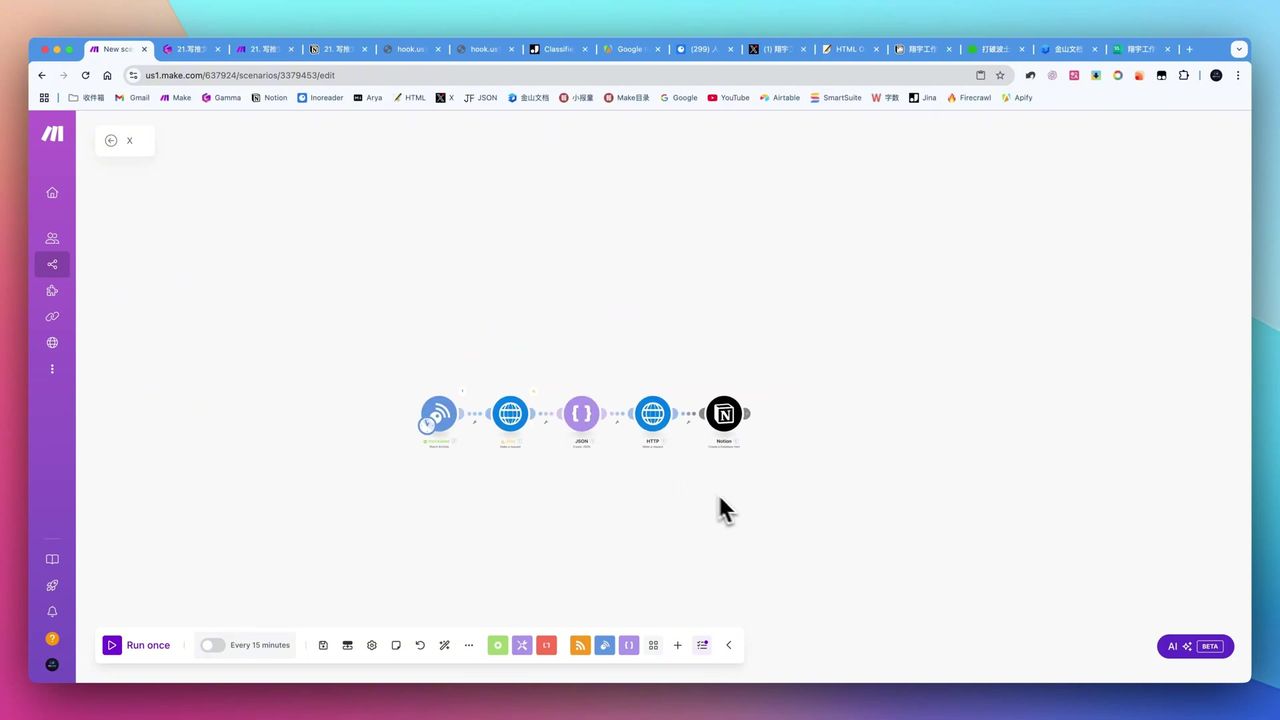 Multi-round AI optimization increases information density
This is the core innovation of this workflow—increasing information density through multi-round AI iteration:
Round 1: Initial Summary
- Compress original text to approximately 200 characters
- Retain core information points
Round 2: Information Enhancement
- Add information entities within character limit
- Optimize expression
Round 3: Final Refinement
- Compress to within 128 characters
- Ensure maximum information density
Example Result: A news article about humanoid robots can be condensed into a high-quality tweet containing company names, technical breakthroughs, product functions (coffee art, late-night snack distribution, etc.), market positioning, and development vision—multiple entities.
Workflow Architecture
Stage 1: Content Aggregation
 Workflow construction foundation
Use Inoreader instead of Make’s built-in RSS module:
Configuration Points:
- Create folders to aggregate multiple RSS feeds
- Select “OK” rather than “From Now” when monitoring
- Otherwise cannot retrieve historical information
Note: Make’s built-in RSS module only supports single URLs, cannot meet multi-source aggregation needs.
Stage 2: Content Extraction and Refinement
Use Jina Reader to retrieve full article text, then perform iterative summarization:
Prompt Design (Round 1):
Please summarize the following article to approximately 200 characters, retaining all key information points:

{{article_content}}
Prompt Design (Final Round):
Please refine the following content into a tweet within 128 characters, requirements:
1. Maximize information density
2. Include as many information entities as possible
3. Concise and powerful expression
4. Suitable for Twitter publication

Current content: {{summary}}
Stage 3: Smart Imagery
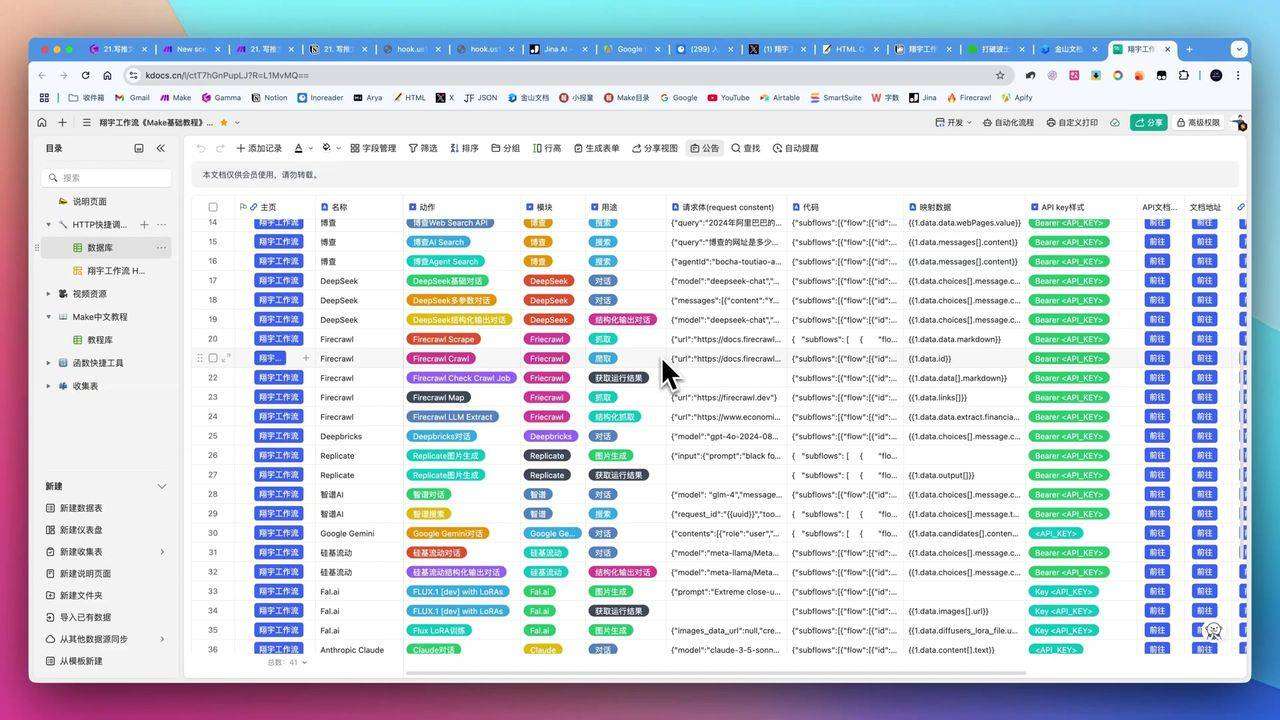 Shortcut tool simplifying API calls
Use Apify to scrape Google Images:
Process:
- Extract keywords from tweet
- Call Apify Google Images Scraper
- Obtain matching image URLs
- Upload to Cloudflare Images
Configuration Points:
- Set 20-30 second sleep to wait for Apify response
- Recommended image size 512x512
- Upload to image host to prevent original expiration
Stage 4: Publication Management
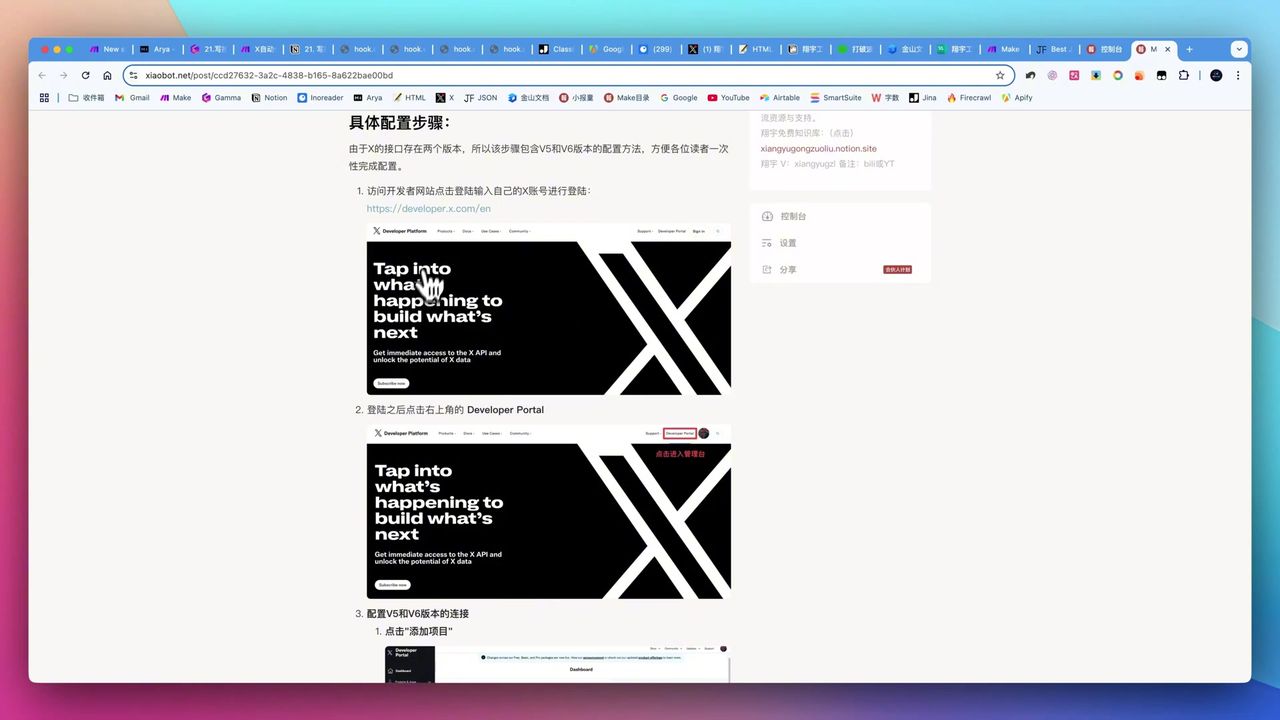 Twitter Developer Platform configuration
Notion Management:
- Store all generated content in Notion
- Manual review and editing
- Trigger publication via link
Twitter API Configuration:
- Must use v6 version (v5 doesn’t support images)
- Create developer project and app
- Obtain API Key, Secret, Access Token
- Correctly configure callback URL
Recommendation: Not recommended for fully unattended publishing. AI content may have minor errors; suggest manual review.
Pitfalls to Avoid
Common issues during setup:
-
Inoreader Configuration - Must select “OK” when monitoring; selecting “From Now” results in no historical data
-
Iteration Overfitting - Multiple iterations without changing character limits may cause content repetition; suggest allowing 5-10% character increase each round
-
Twitter API Version - v5 doesn’t support image uploads; must use v6
-
Complex API Authorization - Twitter developer configuration involves multiple Keys and callback URLs, prone to errors
-
Not Recommended Fully Automatic - AI content may have errors; suggest manual review before publishing
Use Cases
Recommended For
- Content Creators/Tech Bloggers - Need to regularly publish high-quality tweets
- Small Businesses/Personal Brands - Want to automate social media operations
- Make Platform Users - Have some foundation in automation workflows
May Not Suit
- Non-technical users seeking zero-configuration one-click solutions
- Users with extreme quality requirements for AI content
- Those unwilling to invest time learning API configuration
FAQ
Why use multiple iterations for summarization?
Single-round summaries have limited information density. Through 3 iterations, adding information entities each round, you achieve far superior information compression within 128 characters.
Isn’t Make’s built-in RSS module enough?
Make’s built-in RSS module only supports single URLs, not multi-source aggregation. Inoreader supports folder aggregation of multiple RSS feeds, and this feature is free.
Is Twitter API configuration complex?
Yes, it requires creating a developer project, app, obtaining multiple Keys and Secrets, and configuring callback URLs. v5 doesn’t support image uploads; need v6.
Is fully automatic publishing safe?
Not recommended for completely unattended operation. AI-generated content may have minor errors. Suggest manual review and editing in Notion before triggering publication.
Next Steps
After mastering the basics, you can try:
- Add more RSS information sources
- Optimize iterative summarization prompts
- Integrate more social platforms (Telegram, LinkedIn, etc.)
- Add analytics to track publication performance
Feel free to leave comments with questions!
FAQ
- Why use multiple iterations for summarization?
- Single-round summaries have limited information density. Through 3 iterations, adding information entities each round, you achieve far superior information compression within 128 characters.
- Isn't Make's built-in RSS module enough?
- Make's built-in RSS module only supports single URLs, not multi-source aggregation. Inoreader supports folder aggregation of multiple RSS feeds, and this feature is free.
- Is Twitter API configuration complex?
- Yes, it requires creating a developer project, app, obtaining multiple Keys and Secrets, and configuring callback URLs. v5 doesn't support image uploads; need v6.
- Is fully automatic publishing safe?
- Not recommended for completely unattended operation. AI-generated content may have minor errors. Suggest manual review and editing in Notion before triggering publication.
Start Building Your Automation Today
Join 500,000+ users automating their work with Make.com. No coding required, free to start.
Get Started FreeRelated Tutorials
Make.com: Automate Content for WeChat & Social Platforms
Generate Batch Social Media Cards with Make.com
Create Viral Social Posts with DeepSeek V3 & Make.com
Auto-Generate YouTube Titles, Descriptions & Thumbnails
About the author
Alex Chen
Automation Expert & Technical Writer
Alex Chen is a certified Make.com expert with 5+ years of experience building enterprise automation solutions. Former software engineer at tech startups, now dedicated to helping businesses leverage AI and no-code tools for efficiency.
Credentials